
I deliver, you decide
My SEO and AI process has ten steps. At every step I put something concrete on the table, and you respond. Five times there is something for you to choose; I do the rest.
The ten steps of my SEO and AI process
Blue = what I do · black = what you do
Discussing the 360 Visibility Scan
I deliver the free 360 Visibility Scan: a provisional score out of ten, your main keywords in Google, whether AI mentions you yet, the state of your content, technology and authority, how your competitors are doing, and as a preview a first demo impression of your own site.
What you do: we walk through it together in about fifteen minutes. No sales pitch, just the question of whether you understand what it says.
You decide: do we continue, yes or no?The Visibility Plan: your input and view-only access
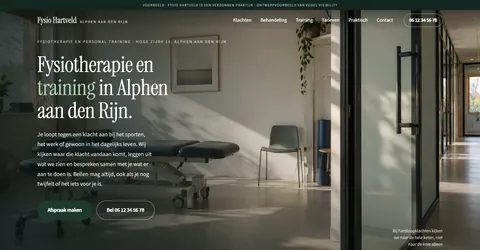
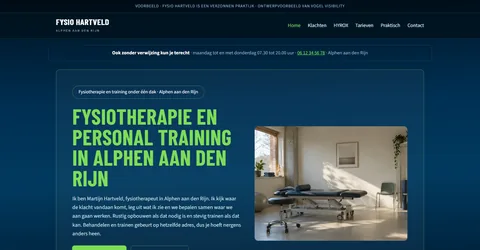
I deliver the full research: all keywords, your competitors side by side on authority, speed, ranking and AI citations, and on top of that the advice on keywords, landing pages and visualisation: not just reading what is possible, but seeing it straight away in worked-out demos of your own site.
What you do: you add four things, simply in your own client portal: one fixed page where all your input, choices and next steps sit together (view a demo portal). No emails to draft, and you can fill it in bit by bit.
- Your competitors: who do you see as your competitors?
- Your keywords: what do you want to be found for, now and in the near future?
- View-only access to Google Search Console and, if you have it, Bing Webmaster Tools. Read-only, so the plan is based on your real clicks and impressions; how to set that up is explained below.
- The intake questionnaire: short but wide-ranging. The business facts for your FAQ (from opening hours to allergens), plus the questions that set direction: which service or product do you want to grow, what do you no longer want to offer, which competitor are you losing customers to, and what should someone know before they call? Whatever you don’t know, I look up.
Deciding the keywords and landing pages
I deliver the Visibility Plan with priorities and the competitive picture, plus substantiated suggestions for your landing pages: which topics, in what order, and why those.
What you do: you choose the keywords you want to be found for and which pages I build. I advise, you make the call, because you know which customers you want. How many pages there are depends on your package.
You decide: which words and which pages? · ±15 minWhat is a landing page, actually?
One page built entirely around one search query, such as “hyrox training” or “lunch with a terrace”. Think of it as a vitamin pill: a concentrated dose of everything someone wants to know about that one topic, with the question answered literally.
That is why it works for all three audiences at once. Google sees a page that is precisely about the search query, an AI finds the complete answer to cite, and the visitor doesn’t have to hunt for where things are. The keyword research shows which questions have enough search volume to deserve such a page; the advice on optimisation and any new pages builds on that.
Choosing the visualisation
I deliver four versions to choose from:
- one based on your current site, so you recognise it
- one real landing page, built around one keyword from your measurement
- two alternative ideas, from subtle to strongly changed, each from its own angle
What you do: look and choose what suits you best. You also pick the style: font, colour palette and font size.
Torn between directions? Then I work out one extra version in the demo style of your choice, and we talk it through once more.
You decide: which visualisation do you want? · ±15 minThe content goes into the site
I deliver the copy, the meta titles, the meta descriptions, the images and the FAQs, and I build them into your website myself. I tackle the technology and the speed at the same time. You don’t have to publish anything.
What you do: you review the copy and the headings page by page, simply in your portal. Is it professionally accurate, does it sound like you? I process your comments and present it again; nothing goes live without your approval.
You decide: approval of copy and images, with its own correction roundReviewing the test version
I deliver everything working on a test environment, including load speed, image optimisation, a clean-code check and the mobile check.
What you do: click around as if you were your own customer. Spot something? I deal with that first; this step has its own correction round too.
You decide: approval to go liveLive
I deliver the final page-by-page check before going live: meta titles and meta descriptions, alt texts and the full SEO and GEO check. Then the launch itself, with submission and indexing at Google and Bing.
What you do: take a look yourself too. Two pairs of eyes see more than one, and you know your trade better than I do.
Follow-up measurement after three months
I deliver exactly the same measurement as before: the same keywords, the same competitors, the same AI questions. So you see not only what changed, but also whether the gap with your competitor narrowed.
What you do: look at the report. If it’s good, it’s good; and if you want more, you know where to find me.
How you let me look along
At step 1 I ask for view-only access. Read-only: I see your reports, but I can’t change anything, submit anything or add anyone. It takes you about two minutes per platform, and you can undo it just as easily.
Which logins actually belong to your website?
More than you might think. Together, this list determines how you show up online; run through it and check whether you can access each one yourself:
- Domain management: where your domain name is registered. Whoever can log in here controls where your site and email point.
- Email: Microsoft 365, Google Workspace or mail hosted with your hosting provider.
- Web hosting: the panel where your website physically runs.
- WordPress (or another site system): where your pages are managed.
- Google Search Console: shows what you are found for on Google.
- Google Business Profile: your listing on Google Maps, with your reviews.
- Bing Webmaster Tools (recommended): the Microsoft counterpart, where ChatGPT and Copilot look too.
Is half of this with an old developer, or do you simply not know? That is very common, and it is exactly what we sort out together in the Visibility Plan.
No Gmail? You can still have a Google account
Search Console and your Business Profile require a Google account, but that does not have to be a Gmail address. You simply create a Google account on your own business email address:
- Go to accounts.google.com and choose Create account.
- Choose Use my current email address instead and enter, say, info@yourcompany.com.
- Confirm the code Google emails to that address, and you are done.
From then on you sign in to Google with your regular business address and manage your Business Profile and Search Console as normal.
Google Search Console
You add me as a restricted user and nothing more is needed. That role can view all reports, but can’t change settings, submit sitemaps, disavow links or manage users.
- Open Search Console and choose Settings at the bottom left.
- Click Users and permissions.
- Click Add user and enter stefan@vogelvisibility.com.
- Choose Restricted as the permission and confirm.
Bing Webmaster Tools
There, the same kind of access is called Read-only, and that role too can only view data and reports.
- Open Bing Webmaster Tools and go to User Management in the menu on the left.
- Click Add user and enter stefan@vogelvisibility.com.
- Choose Read-only as the role and confirm.
No Bing Webmaster Tools yet? Then we set it up together in fifteen minutes; importing from Search Console takes one click. Free, and a valuable window on AI traffic.
Rather skip the hassle? Give me a quick call or email and we’ll walk through it together while you watch. And once the follow-up measurement is done, you remove me again in the same two minutes.
When I start building
From step 3 onwards I don’t just look along: I genuinely modify your website and build inside it. The landing pages, the technology, the speed: it all happens inside your own site, not next to it. These three forms of access are the basis for that. I only ask for them once you approve the build, and afterwards you undo them just as easily.
WordPress
You create a separate administrator account for me. Safer than sharing your password, and afterwards you simply delete the account again.
- Log in to your WordPress and choose Users in the menu on the left.
- Click Add New User.
- Enter stefan@vogelvisibility.com as the email address and choose Administrator as the role.
- Click Add User; I automatically receive a login email.
Your web hosting
For the speed, the security and the launch I need access to your site’s hosting: the panel where your domain and web space run.
- Check where your site is hosted; it’s on the invoice or in the email from your hosting provider.
- Does your hosting panel support guest users or extra accounts? Then invite stefan@vogelvisibility.com.
- Not possible, or not sure? Give me a quick call or email and we’ll figure it out together. It’s done in no time.
Google Business Profile
You add me as a manager. Then I complete your profile and set up the review invitation.
- Go to google.com/business and log in with your business profile account.
- At your profile, open the three-dot menu and choose Business Profile settings.
- Click People and access, then Add.
- Enter stefan@vogelvisibility.com, choose the Manager role and confirm.
Where the costs are
Free 360 Visibility Scan
Step 0. No strings attached, even if you never do anything else with me.
Visibility Plan · €250
Steps 1 and 2. Fully credited if you go ahead within three months.
Visibility Package · from €1.000
Steps 3 to 7. One focused build week. See the Visibility Packages.
What I need from you, and when
Visibility Scan: nothing
I measure from the outside, with public sources and my measurement platforms. Search Console and Bing only come in at the Visibility Plan.
Visibility Plan: view-only access
Read-only access to Google Search Console and Bing Webmaster Tools. That way the plan is based on your actual figures. How to set that up.
On approval: build access
A separate WordPress administrator account for me and the hosting login, in full confidence. After delivery you simply change all the passwords again.
Honest about results
Optimisation is not a switch you flip. Search engines and AI systems have to re-examine your site and build up trust; that takes weeks to months. That’s why I measure beforehand and after three months, so the progress becomes visible. Anyone promising instant results is selling hot air; Google itself warns about this. The foundation I lay stays in place; expanding or adjusting later is always possible, without a compulsory retainer.
Already have a marketing agency?
Fine. Your marketing agency can keep focusing on campaigns, advertising, social media and blogs. Vogel Visibility tackles a different part: I measure and improve the foundation of your website, so search engines and AI platforms better understand what you offer and which questions you are relevant for.
After delivery, your marketing agency can build on that. Complementary, not competing. I am happy to point out what your agency already does well. More on this: outsourcing SEO without a retainer.
Who you’ll be dealing with
No account manager, but the person doing the work: Stefan Vogel. Where the trade calls for it, I bring in an outside specialist. I use AI tools extensively for research and analysis, but everything your customer reads has been conceived and approved by a human.